Setting Up a Mac for Agents
I had Hermes read my new Mac Studio and my old Mac mini, then write a setup checklist. Here is what carries over to any Mac set up for agents consider using it for your own setup.
I got a new Mac Studio. Before I installed anything, I asked Hermes to read the new machine and my old Mac mini as a reference, research what's current, and write me a checklist I could come back to.
The studio has three jobs. A dev machine for Hermes and Claude Code. A Hermes host I can reach from my phone and laptop. And a Battle.net box for the World of Warcraft game and perhaps some LOL. Most of what follows applies to any Mac you plan to hand to an agent.
This post has two readers. You first, then your agent. Read it, decide what you want, then hand your agent this:
Read https://www.drkpxl.com/setting-up-a-mac-for-agents/ and set up this Mac by following the For agents section.
Show me the dry run first. Ask me before anything that needs my password.
The kit near the bottom is a Brewfile, two shell files and a setup script. Your agent saves them, runs the script, and walks you through what's left.
Start with a checklist
The first thing I got back was an HTML page. Short answers to my questions up top, the specs it read off the machine, a comparison with the mini (copy this, do this differently, don't copy this), then ten phases of checkboxes. Progress saves in the browser.
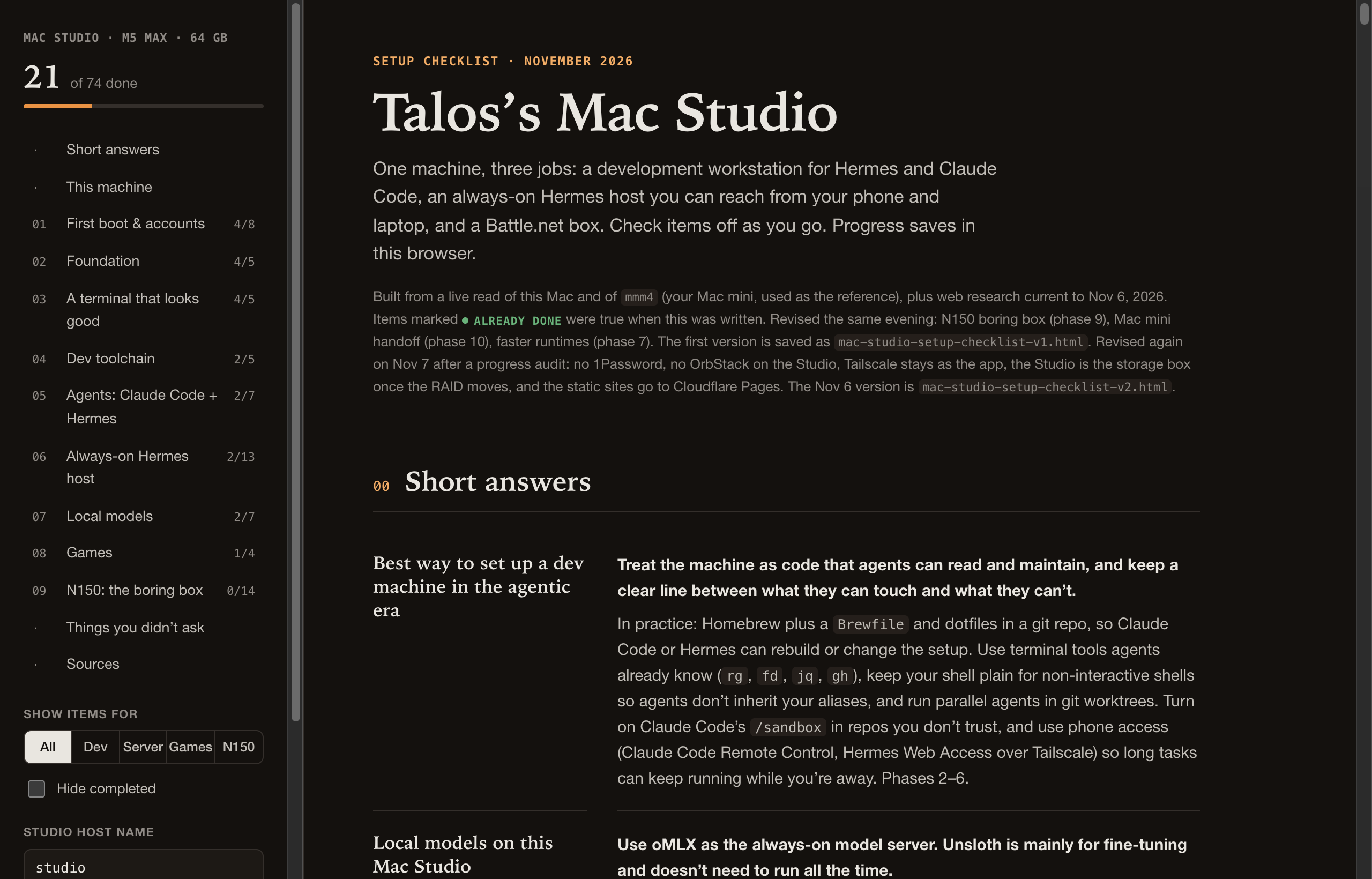
- It read the live machine first. FileVault on, firewall off, no Homebrew, no Rosetta, sleep after one minute.
- It read my old machine. The mini had good habits worth copying and bad ones worth leaving behind, like a sudo password sitting in a
.envfile and a model server listening on every interface with no auth.
If you do this yourself, ask for both. An agent that has looked at your actual machine gives better advice than one working from a generic guide.
Treat the machine as code
Everything installable lives in a Brewfile in a dotfiles repo. So do .zshrc, .zprofile, the terminal config and the prompt config, symlinked back into place. Commit it, and Claude Code or Hermes can rebuild or change the setup from then on.
The terminal is cmux with Starship, a Nerd Font, and the modern replacements: eza, bat, dust, duf, rg, fd, fzf, zoxide.
Give agents a plain shell
This is the one I would tell everyone. Agents run your shell without a terminal attached. If ls is aliased to eza --icons and cat to bat, the output they parse changes. The fix is a guard at the top of .zshrc:
# non-interactive shells (agents, scripts): stop here
if [[ ! -t 0 || ! -t 1 ]]; then
  return
fi

# prompt, aliases and plugins below only load for you
eval "$(starship init zsh)"
alias ls='eza --icons --group-directories-first'
alias cat='bat --paging=never'
Anything agents need on their PATH goes in .zprofile, which every login shell reads. The full versions of both files are in the kit below.
Then watch your installers. The local model server I installed appended its PATH block to the bottom of .zshrc, after the return. My shell found it. Hermes didn't. One command catches it after any install:
zsh -lc 'which <tool>'
Sign in as yourself
I asked whether to sign in with my real Apple Account or run Hermes in a container. Hermes said sign in, and I agree. iMessage, Notes, Reminders, computer use and the Metal GPU for local models only work when the agent runs as you on the host. A container is a Linux VM with none of those.
The boundaries go elsewhere:
- FileVault on.
- Firewall on.
- Every agent surface reachable on the tailnet only. No router port forwards.
- Approvals on.
- No sudo password stored anywhere. I approve sudo myself.
- Claude Code's
/sandboxturned on per project for code I don't trust, not globally. A global sandbox fights you on every Hermes task that needs the network.
For secrets, I don't like 1Password or Bitwarden. Apple Passwords holds my logins.
Split the playground from the boring box
The old mini ran everything: bots, crons, webhooks, a few small public sites. Moving all of that to a shiny new workstation felt wrong. I wanted the Studio free to reboot, run a 27B model, or sit at the FileVault screen without breaking the morning briefing.
So the always-on work moves to a small Linux mini PC. It boots unattended, needs no unlock, and pulls about 7 watts. The Studio is the playground. Hermes Desktop can connect to both.
Two rules came out of that:
- One bot token, one gateway. Two Hermes gateways polling the same Telegram bot knock each other offline. Copy your skills to the new machine, not the whole Hermes backup.
- The boring box never depends on the playground. Crons use cloud models first. The Studio's local model is a fallback at most.
Power and reboots
sudo pmset -a sleep 0 womp 1 autorestart 1
Never sleep, wake for network access, turn back on after a power cut. The checklist also had disksleep 0. I took it out. The external RAID is idle 99% of the time, and I don't need the extra power or wear. A few seconds of spin-up is fine.
With FileVault on, an unplanned restart stops at the unlock screen. On Apple Silicon running macOS 26 or later you can unlock it over SSH, but only from the LAN, before Tailscale is running. Use sudo fdesetup authrestart for planned reboots, reserve the Mac's address in your router, and test the SSH unlock once before you need it. Keep security responses automatic and make macOS updates manual, so an update never reboots you into that screen at 2am.
Reach it from anywhere, on the tailnet only
Remote Login is in System Settings, General, Sharing. It sits at the bottom under Advanced, which is why I couldn't find it.
For HTTPS to the Hermes Webapp, Tailscale Serve gets the certificate for you:
- Rename the machine in the Tailscale admin console first. The certificate is issued for that name, and certificate names land in public logs.
- In the admin console under DNS, turn on MagicDNS, then Enable HTTPS.
- Publish the port to the tailnet only:
tailscale serve --bg 9120
Local models
oMLX is the model server. It keeps the KV cache on the SSD, so the long system prompts agents resend every turn don't get reprocessed after a restart. One model server, one good model: Qwen3.8-27B, the MTP build, 16 GB. The MTP build already does the speculative decoding behind most of the faster numbers floating around.
Hermes needs at least a 64K context window. oMLX has a global default of 32,768 and a per-model setting that overrides it. Mine was already at 262,144.
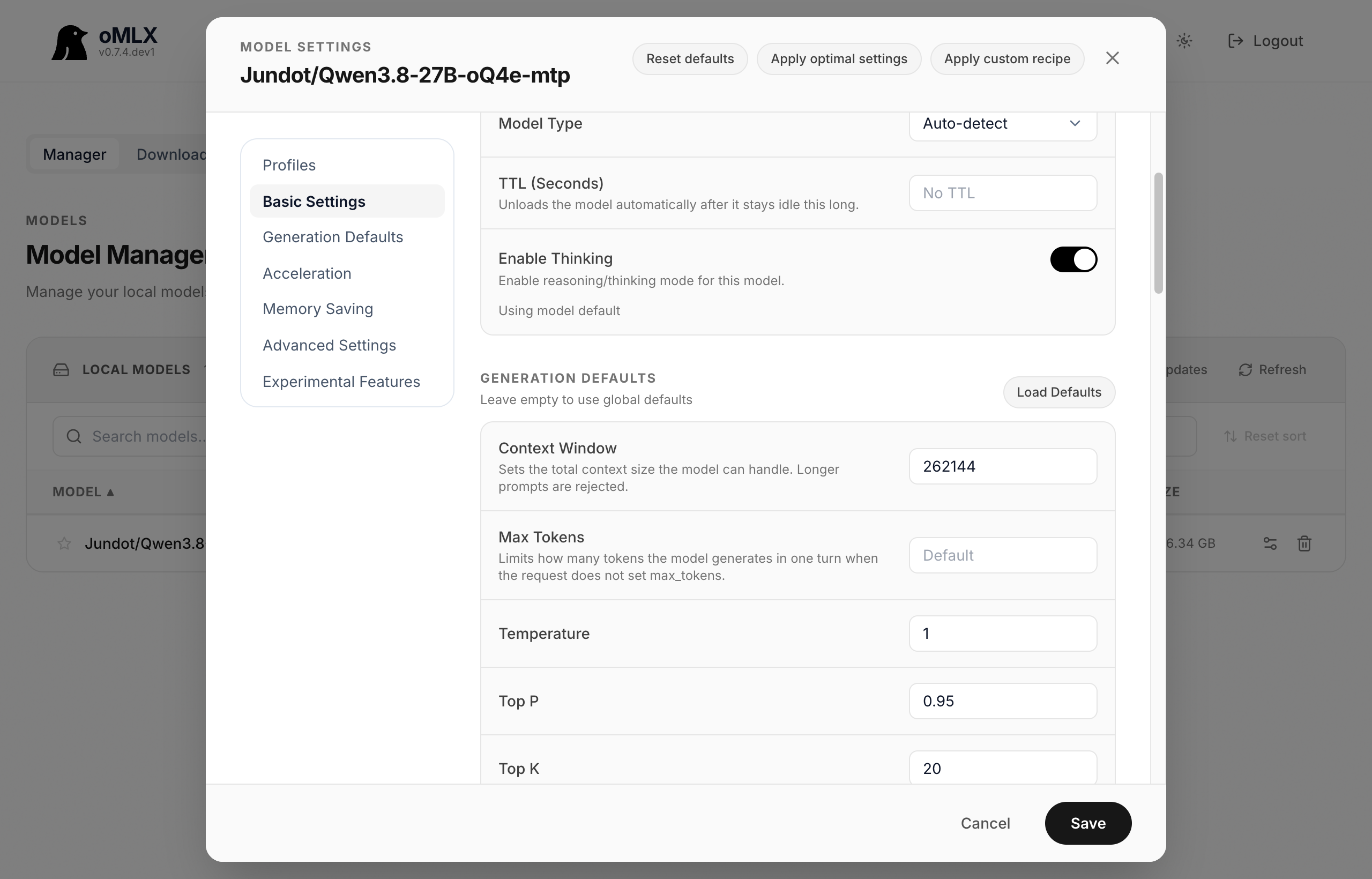
I left it at 256K. Memory isn't the issue: only 16 of the model's 64 layers use full attention and the cache is 4-bit, so the full window costs about 4 GB. The trade is speed. Hermes compresses at half the window, so a conversation can grow to 128K tokens before it gets trimmed, and a 27B model working through that much is slow. If long sessions drag, 128K is the setting to try.
The kit
Four files. Save them in ~/dotfiles. The script expects the other three next to it.
The script is safe to run twice. It skips anything already done, backs up an existing .zshrc or .zprofile before linking the new ones, and never stores a password. By default it sets up a dev machine. --host adds the always-on pieces (firewall, power, Tailscale) and asks for your password. --models adds oMLX and suggests a model size for your memory. --dry-run shows every command without running it.
Brewfile
# Brewfile: a Mac set up for agents. Install with: brew bundle --file ~/dotfiles/Brewfile

# terminal
cask "cmux"                           # terminal built on Ghostty, flags the tab where an agent is waiting
cask "font-jetbrains-mono-nerd-font"
brew "starship"                       # prompt
brew "zsh-autosuggestions"
brew "zsh-syntax-highlighting"

# command line tools agents already know
brew "ripgrep"; brew "fd"; brew "jq"; brew "yq"
brew "git"; brew "gh"; brew "git-delta"; brew "lazygit"
brew "tmux"; brew "wget"

# nicer versions of the basics, for you (aliased in interactive shells only)
brew "eza"; brew "bat"; brew "dust"; brew "duf"
brew "fzf"; brew "zoxide"; brew "btop"; brew "glow"; brew "tlrc"
brew "macmon"                         # Apple Silicon GPU and power, handy with local models

# language runtimes
brew "mise"                           # node, go, bun versions
brew "uv"                             # python and virtual environments
zprofile
# ~/.zprofile: every login shell reads this, agents included. PATH goes here.
eval "$(/opt/homebrew/bin/brew shellenv zsh)"
export PATH="$HOME/.local/bin:$HOME/.omlx/bin:$PATH"
eval "$(mise activate zsh --shims)"
zshrc
# ~/.zshrc
# Agents and scripts run without a terminal attached. Stop here for them,
# so they get plain commands and none of the aliases below.
if [[ ! -t 0 || ! -t 1 ]]; then
  return
fi

HISTSIZE=50000; SAVEHIST=50000
setopt SHARE_HISTORY HIST_IGNORE_ALL_DUPS HIST_IGNORE_SPACE INTERACTIVE_COMMENTS AUTO_CD

eval "$(starship init zsh)"
eval "$(zoxide init zsh)"
eval "$(mise activate zsh)"
source <(fzf --zsh)
export FZF_DEFAULT_COMMAND="fd --type f --hidden --follow --exclude .git"

alias ls='eza --icons --group-directories-first'
alias ll='eza -lh --icons --git --group-directories-first'
alias lt='eza --tree --level=2 --icons'
alias cat='bat --paging=never'
alias lg='lazygit'
alias du='dust'
alias df='duf'

source /opt/homebrew/share/zsh-autosuggestions/zsh-autosuggestions.zsh
source /opt/homebrew/share/zsh-syntax-highlighting/zsh-syntax-highlighting.zsh   # keep last

# Installers like to append PATH lines below this point, where agents never
# see them. Move anything they add up into ~/.zprofile.
setup.sh
#!/bin/bash
# setup.sh: set up a Mac for agents. Safe to run more than once.
#   bash ~/dotfiles/setup.sh --dry-run            show what it would do
#   bash ~/dotfiles/setup.sh                      dev machine
#   bash ~/dotfiles/setup.sh --host --models      plus always-on host and local models
# Expects Brewfile, zprofile and zshrc next to it in ~/dotfiles.
set -euo pipefail

DOT="${DOTFILES:-$HOME/dotfiles}"
STAMP=$(date +%Y%m%d-%H%M%S)
DRY=0; HOST=0; MODELS=0; TODO=""
for a in "$@"; do
  case "$a" in
    --dry-run) DRY=1 ;;
    --host)    HOST=1 ;;
    --models)  MODELS=1 ;;
    *) echo "unknown option: $a"; exit 2 ;;
  esac
done

say()  { printf '\n==> %s\n' "$*"; }
ok()   { printf '    ok: %s\n' "$*"; }
run()  { printf '    + %s\n' "$*"; if [ "$DRY" = 0 ]; then "$@"; fi; }
todo() { TODO="$TODO    - $*"$'\n'; }
have() { command -v "$1" >/dev/null 2>&1; }

say "This Mac"
[ "$(uname -s)" = Darwin ] || { echo "macOS only"; exit 1; }
[ "$(id -u)" != 0 ] || { echo "Run as your own user, not root."; exit 1; }
[ "$(uname -m)" = arm64 ] || echo "    warning: written for Apple Silicon"
for f in Brewfile zprofile zshrc; do
  [ -f "$DOT/$f" ] || { echo "Missing $DOT/$f. Save it from the post first."; exit 1; }
done
MEM_GB=$(( $(sysctl -n hw.memsize) / 1073741824 ))
echo "    macOS $(sw_vers -productVersion), $(uname -m), ${MEM_GB} GB memory"
echo "    $(fdesetup status | head -1)"
[ "$DRY" = 1 ] && echo "    dry run: nothing will change"

say "Command Line Tools"
if xcode-select -p >/dev/null 2>&1; then ok "installed"
else
  run xcode-select --install
  [ "$DRY" = 1 ] || { echo "Finish the installer window, then run this again."; exit 0; }
fi

say "Homebrew"
if [ -x /opt/homebrew/bin/brew ]; then ok "installed"
else run /bin/bash -c "$(curl -fsSL https://raw.githubusercontent.com/Homebrew/install/HEAD/install.sh)"
fi
[ -x /opt/homebrew/bin/brew ] && eval "$(/opt/homebrew/bin/brew shellenv bash)"
if have brew; then
  if [ "$DRY" = 1 ]; then brew bundle check --file "$DOT/Brewfile" --verbose 2>&1 | sed 's/^/    /' || true
  else run brew bundle --file "$DOT/Brewfile"
  fi
fi

say "Shell files"
link() {
  if [ -L "$2" ] && [ "$(readlink "$2")" = "$1" ]; then ok "$2"; return; fi
  if [ -e "$2" ] || [ -L "$2" ]; then
    run mv "$2" "$2.pre-setup-$STAMP"
    todo "Check $2.pre-setup-$STAMP for lines worth keeping. PATH lines go in ~/.zprofile."
  fi
  run ln -s "$1" "$2"
}
link "$DOT/zprofile" "$HOME/.zprofile"
link "$DOT/zshrc" "$HOME/.zshrc"
if [ ! -f "$HOME/.config/starship.toml" ] && have starship; then
  run mkdir -p "$HOME/.config"
  run starship preset catppuccin-powerline -o "$HOME/.config/starship.toml"
fi
if [ ! -f "$HOME/.config/ghostty/config" ]; then   # cmux reads Ghostty's config
  run mkdir -p "$HOME/.config/ghostty"
  [ "$DRY" = 1 ] || printf 'font-family = JetBrainsMono Nerd Font\nfont-size = 14\ntheme = Catppuccin Mocha\n' > "$HOME/.config/ghostty/config"
fi
run mkdir -p "$HOME/code"
[ -d "$DOT/.git" ] || { run git -C "$DOT" init -q; todo "Commit ~/dotfiles and push it to a private repo."; }

say "git"
gset() {
  if git config --global --get "$1" >/dev/null 2>&1; then ok "$1"
  else run git config --global "$1" "$2"
  fi
}
gset init.defaultBranch main
gset pull.rebase true
gset merge.conflictStyle zdiff3
gset core.pager delta
gset interactive.diffFilter "delta --color-only"
gset delta.navigate true
git config --global --get user.email >/dev/null 2>&1 \
  || todo "git config --global user.name 'Your Name' and user.email '<your email>'"

say "Runtimes"
if have mise; then
  if mise ls --global node 2>/dev/null | grep -q node; then ok "node"; else run mise use -g node@lts; fi
fi
have uv && run uv python install

say "Agents"
if have claude || [ -x "$HOME/.local/bin/claude" ]; then ok "Claude Code"
else
  run /bin/bash -c "curl -fsSL https://claude.ai/install.sh | bash"
  todo "Run claude once to sign in."
fi
if have hermes || [ -x "$HOME/.local/bin/hermes" ]; then ok "Hermes"
else
  run /bin/bash -c "curl -fsSL https://raw.githubusercontent.com/NousResearch/hermes-agent/main/scripts/install.sh | bash"
  todo "Run hermes model to pick a model."
fi

if [ "$HOST" = 1 ]; then
  say "Always-on host (asks for your password)"
  case "$(/usr/libexec/ApplicationFirewall/socketfilterfw --getglobalstate)" in
    *enabled*) ok "firewall" ;;
    *) run sudo /usr/libexec/ApplicationFirewall/socketfilterfw --setglobalstate on ;;
  esac
  if pmset -g batt | grep -q InternalBattery; then
    echo "    skipped power settings: this Mac has a battery"
  elif pmset -g | grep -Eq '^ sleep +0' && pmset -g | grep -Eq '^ autorestart +1'; then ok "never sleeps, restarts after power loss"
  else run sudo pmset -a sleep 0 womp 1 autorestart 1
  fi
  if [ -d /Applications/Tailscale.app ]; then ok "Tailscale"
  elif have brew; then run brew install --cask tailscale-app
  fi
  todo "System Settings > General > Sharing > Advanced: turn on Remote Login."
  todo "Open Tailscale and sign in. Admin console: disable key expiry for this Mac, turn on MagicDNS and HTTPS certificates."
  todo "Keep security responses automatic, turn off automatic macOS installs. Use sudo fdesetup authrestart for planned reboots."
  todo "hermes gateway install, then publish only to the tailnet: tailscale serve --bg 9120"
fi

if [ "$MODELS" = 1 ]; then
  say "Local models"
  if [ -d /Applications/oMLX.app ]; then ok "oMLX"
  else
    case "$(sw_vers -productVersion)" in 15.*) P=macos15 ;; *) P=macos26 ;; esac
    URL=$(curl -fsSL https://api.github.com/repos/jundot/omlx/releases/latest \
      | jq -r --arg p "$P" '.assets[] | select(.name | endswith(".dmg") and contains($p)) | .browser_download_url' | head -1)
    MNT="${TMPDIR:-/tmp}/omlx-mnt"
    run curl -fL -o "${TMPDIR:-/tmp}/omlx.dmg" "$URL"
    run hdiutil attach -nobrowse -quiet -mountpoint "$MNT" "${TMPDIR:-/tmp}/omlx.dmg"
    run cp -R "$MNT/oMLX.app" /Applications/
    run hdiutil detach -quiet "$MNT"
  fi
  if   [ "$MEM_GB" -ge 64 ]; then M="a 27B dense model at 4-bit, about 16 GB"
  elif [ "$MEM_GB" -ge 32 ]; then M="a 9B to 14B model at 4-bit, 6 to 9 GB"
  else M="a 4B to 8B model, or skip local models on this Mac"
  fi
  todo "Open oMLX, let it pick a model folder, download $M."
  todo "oMLX dashboard > Models > the model's settings: Context Window at least 65536 (Hermes needs 64K)."
  todo "hermes model > Custom endpoint > http://127.0.0.1:8000/v1 with the oMLX API key."
fi

say "Check"
for t in brew git gh rg jq mise uv claude hermes; do
  if zsh -lc "command -v $t" >/dev/null 2>&1; then ok "$t on the agent PATH"
  else echo "    missing from the agent PATH: $t"
  fi
done
if [ -z "$(zsh -lc 'alias ls' 2>/dev/null || true)" ]; then ok "agent shells get no aliases"
else echo "    warning: agent shells see your aliases. Check the guard at the top of ~/.zshrc."
fi

say "Left for you"
if [ -n "$TODO" ]; then printf '%s' "$TODO"; else echo "    nothing"; fi
echo "    - Keep FileVault on. Never store your sudo password in a .env file."
For agents
You are setting up a Mac with its owner present. Work in this order.
- Read the machine before changing anything:
sw_vers,uname -m,sysctl -n hw.memsize,fdesetup status,ls -la ~/.zshrc ~/.zprofile, andcommand -v brew claude hermes. Tell the owner what you found. - Ask three questions. Should this Mac stay on and be reachable from their phone and laptop (
--host)? Do they want local models (--models)? Is there anything in their current~/.zshrcor~/.zprofilethey need to keep? - Save the four blocks from the kit, exactly as written, to
~/dotfiles/Brewfile,~/dotfiles/zprofile,~/dotfiles/zshrcand~/dotfiles/setup.sh. Add Brewfile lines for apps the owner names. Don't remove the guard at the top ofzshrc. - Run
bash ~/dotfiles/setup.sh --dry-runwith the flags they chose. Show them the output. - Run it for real once they say go. Homebrew and the
--hoststeps ask for their password in the terminal. They type it. Never ask them to paste it to you, and never write it to a file. - If the script backed up an old
.zshrcor.zprofile, move any PATH lines from the backup into~/dotfiles/zprofile. - Check the result:
zsh -lc 'alias ls'prints nothing, andzsh -lc 'command -v brew claude hermes'finds all three. - Walk them through the "Left for you" list the script prints. Those steps need System Settings, a browser or a sign-in.
- Commit
~/dotfilesand offer to push it to a private repo.
Don't turn FileVault off. Don't open ports on the router or put an agent's web interface behind a public tunnel. Don't install the Homebrew Claude Code cask next to the native install.
End state
- Brewfile,
.zshrc,.zprofile, terminal and prompt config in a dotfiles repo, symlinked into place. - Agent shells are plain. My shell has the icons.
- FileVault, firewall and Remote Login on. Never sleeps. Restarts after a power cut. Disks spin down.
- Hermes Webapp over Tailscale HTTPS, tailnet only.
- oMLX serving a 27B model with room for a 256K window.
- 21 of 74 items done. Most of what's left is the boring box.
That's practical AI to me. Hand it the checklist, keep the overrides.